
January 17, 2026
How We Hit 94–100 PageSpeed Scores on Mobile (and What AI Changed)
By Devflares Team
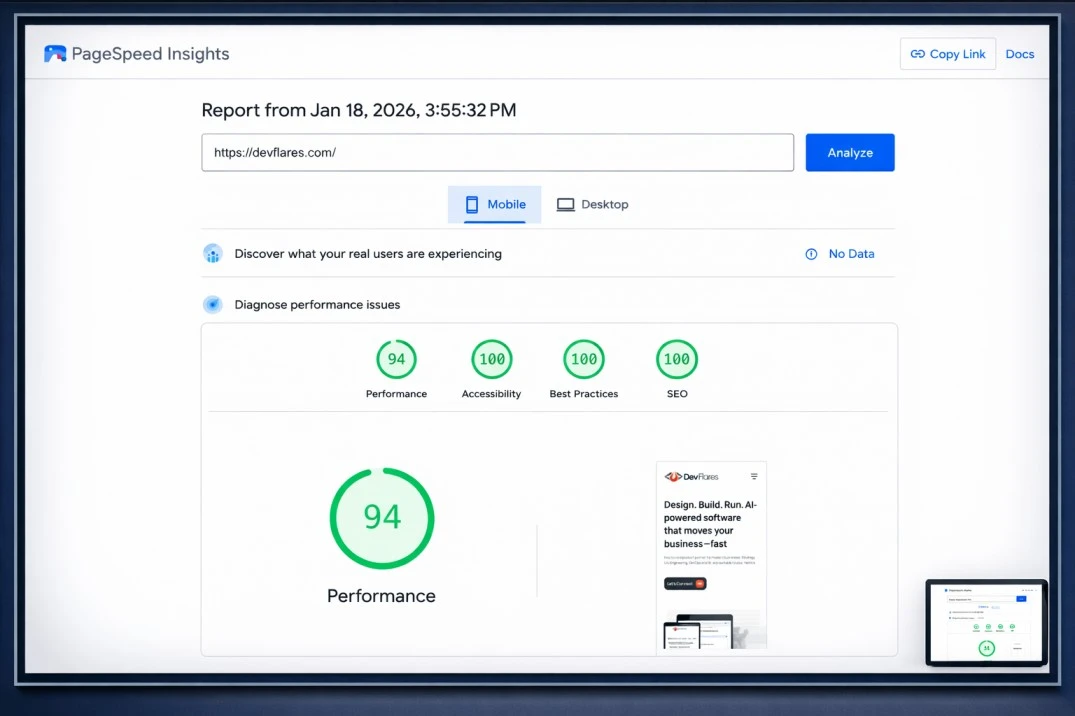
We recently pushed our company site to strong mobile PageSpeed results: Performance 94 and 100s across Accessibility, Best Practices, and SEO.
This post explains why those scores matter, what work actually moved the needle, and how we used AI to accelerate the last 15–20% lift across categories in a single day.
High scores are not a vanity metric—they’re a proxy for user experience, trust, and operational discipline.
Why this matters now: faster, more reliable sites convert better, reduce acquisition waste, and build credibility—especially on mobile networks where your first impression is often your only impression.
The baseline: what we measured (and why mobile is hardest)
We started with PageSpeed Insights on mobile because it’s the most constrained environment: slower CPUs, less memory, and inconsistent networks.
The goal wasn’t perfection; it was a consistently high PageSpeed Insights score that reflects real user experience and stays stable as we ship.
Why each category matters (Performance, Accessibility, Best Practices, SEO)
Performance maps to how fast users see meaningful content and can interact. It correlates with bounce rate and conversion, and it’s closely tied to Core Web Vitals.
Accessibility ensures the site is usable for more people (keyboard users, screen readers, low vision). Better semantic markup also improves maintainability and helps downstream tooling.
Best Practices covers modern, safe, durable engineering: secure delivery, avoiding deprecated patterns, and preventing avoidable UX and security footguns.
SEO ensures your content can be discovered, understood, and indexed. It’s the baseline for organic growth and brand credibility—especially when paired with clean technical SEO foundations.
What actually moved the needle (the boring work that wins)
Good scores are typically the result of a lot of small, correct decisions—repeated consistently. Our improvements centered on web performance optimization, code hygiene, and content semantics.
- Rendering and payload discipline: reduce unused CSS/JS, ship smaller bundles, and avoid blocking the main thread.
- Media hygiene: right-size assets and prioritize above-the-fold visuals with intentional image optimization.
- Interaction quality: remove long tasks and tighten event handling to improve INP and perceived responsiveness.
- Accessibility hygiene: improve headings, labels, contrast, and keyboard flows so accessibility is not an afterthought.
- Engineering guardrails: keep dependencies and browser APIs modern, and remove patterns that trigger Lighthouse warnings.
We treated Lighthouse findings as a starting point, then validated changes with real behavior—not just passing audits.
How AI sped up the last 15–20% (without shipping junk)
The biggest acceleration came from using AI to compress the “identify → propose → validate” loop. The outcome wasn’t magical fixes; it was faster, higher-quality iteration.
- Triage at scale: AI summarized audit output and grouped repeated issues so we didn’t fix the same root cause five times.
- Change suggestions: AI proposed code and markup edits, then engineers reviewed and applied the safe ones.
- Quality checks: AI flagged missing alt text patterns, weak link labels, and semantic gaps that affect accessibility and SEO.
- Documentation: AI helped convert fixes into repeatable checklist items for CI/CD, so the score doesn’t regress quietly.
This is where we saw the fastest gains in our PageSpeed Insights score: common issues were handled in batches, and we spent human attention on the risky edge cases.
Structured data that stays honest
Rich results and enhanced snippets can help visibility, but only when structured data reflects what’s actually on the page. We validated our structured data and kept it aligned with visible content.
We also treated structured data as part of technical SEO, not a one-time “add schema” task: it needs ownership, testing, and updates when content changes.
Risks & Guardrails
AI is powerful, but it can also introduce subtle regressions if you treat suggestions as truth. We used guardrails to keep changes safe and auditable.
- Human review: engineers approve all code and markup changes; no direct-to-prod automation.
- Scope control: optimize one bottleneck at a time; avoid broad refactors during performance work.
- Regression protection: add checks so performance, accessibility, and SEO improvements don’t silently degrade later.
- No false promises: we don’t claim ranking guarantees; we focus on measurable UX and correctness.
Practical rollout plan
If you want to replicate this on a production site, treat it like an engineering initiative with tight feedback loops.
- Run an initial audit: capture mobile baselines and the top repeat offenders.
- Fix the highest-leverage items: tackle rendering blockers, payload bloat, and key interaction bottlenecks first.
- Clean up semantics: address accessibility gaps, then validate Best Practices and SEO basics.
- Validate structured data: ensure it matches visible content and stays maintained.
- Automate regression checks: bake budget checks and audit steps into CI/CD.
- Repeat monthly: performance is a process; keep the PageSpeed Insights score stable as you ship.
On our stack, this work fit naturally into Angular and Angular SSR patterns, backed by TypeScript and a small Node.js surface where needed.
Where DevFlares Helps
DevFlares is an engineering-led partner for secure, scalable digital products. We help teams ship fast sites that stay fast—without trading off reliability or governance.
If you want to raise your performance, accessibility, Best Practices, and SEO scores with a measurable plan (and responsible AI workflows), we’re happy to review your current baseline and map the shortest path to durable improvements.